
Absorption
Size keeps hitting one side and price refuses to move. Someone big is on the other side of it. That is your line in the sand — and your stop sits right behind it.
The footprint, the ladder and the profile live on NinjaTrader. Your account lives on MetaTrader 5. Take the trade on one and the other follows — re-sized to the percent of the account you chose, with your stop and target carried across.
A candle tells you price went up. A footprint tells you 812 contracts hit the offer at 21 380.25 and price didn't move — that's absorption, and that's a trade.
Size keeps hitting one side and price refuses to move. Someone big is on the other side of it. That is your line in the sand — and your stop sits right behind it.
Three or more price levels in a row where one side traded 3× the other. It marks where aggression actually showed up — not where a lagging indicator says it did.
Market Profile answers where. Is the market accepting this price or rejecting it? Value area, single prints, poor highs — the map you trade the footprint inside of.
NinjaTrader is where the order flow lives — the footprint, the ladder, the profile. Funding is mostly on MetaTrader 5. This closes the gap: you trade the platform that shows you the market, and the account that pays you copies it by itself.
It copies your own account, on your own machine. Nothing is sent anywhere, no signal is bought or sold, and it never decides a trade. Manual clicks, an ATM strategy or a NinjaScript strategy — anything that moves the position is mirrored.
An AddOn watches the account five times a second and writes down what it sees: open positions, the average entry, and the working stop and target orders. It places nothing and cancels nothing — it only reads. Several accounts can be exported at once, so a sim account and a live one stay separate.
This is the part that matters. Two NQ contracts do not become two lots. The bridge reads the distance between your entry and your actual stop, then works out the position size that risks the percent you chose of the MT5 account. A $25k evaluation and a $200k funded account each risk their own correct amount from the same trade — and the same stop is placed on the MT5 side, so the number is real rather than assumed.
An Expert Advisor compares the two accounts several times a second and corrects the difference. Scale in and it scales in. Trail your stop and the stop follows. Go flat and it goes flat. Because it reconciles state instead of replaying orders, a restart mid-trade adopts the open position rather than firing a duplicate.
A daily loss limit and a total drawdown limit, both watched live. Hit one and every position it manages is closed and copying stops — the daily one until tomorrow. A hard lot cap sits on top, so a tight stop can never turn a percent into a position the account cannot carry.
If NinjaTrader freezes or closes, open positions are held with their stops and nothing new is opened — it does not guess. A closed market or a refused order is retried rather than treated as a fault. A missed read never counts as a dead feed.
A local control panel: on/off, risk percent, the limits, which NinjaTrader account to follow, and a close-everything button. It shows both platforms live, side by side. There is also a dry-run mode that logs every trade it would have taken without placing one.
Both platforms have to be open on the same machine — a browser cannot reach MetaTrader, so there is no version of this that runs while your PC is off. A VPS solves that. And a futures contract is not a CFD: the same index has a different spread, different session breaks and different fills, so expect the two accounts to track each other closely, not tick for tick. Anything holding seconds or longer copies cleanly; sub-second scalping is not what this is for.
An installer puts every piece where it belongs — then it is two clicks
Full write-up: the NinjaTrader to MT5 trade copier — setup, sizing and limits →
Most people learn the footprint first and drown in it. Context comes first, then the tape, then execution. Skip a layer and you are just watching numbers flicker.
Where is value? Where did the market reject price and leave a scar? You learn to read the day before it opens: prior value area, single prints, poor highs and lows, and the four open types that tell you what kind of day you are in by 10:00.
Now that you know where, the footprint tells you who. Bid×ask at every price, delta, cumulative delta divergence, absorption, stacked imbalance, and the difference between a real trapped-trader flush and noise that just looks like one.
The part that actually decides whether you keep the money. Position sizing against a fixed daily loss cap, where the stop goes when your thesis is structural, when to scratch, and how to pass a prop-firm evaluation without blowing the trailing drawdown on day three.
Two indicators I built for my own charts and kept. They read the same three things the method above is built on — where volume actually traded, where price refused to leave, and who was doing the lifting. Free, both of them, for as long as you want them.
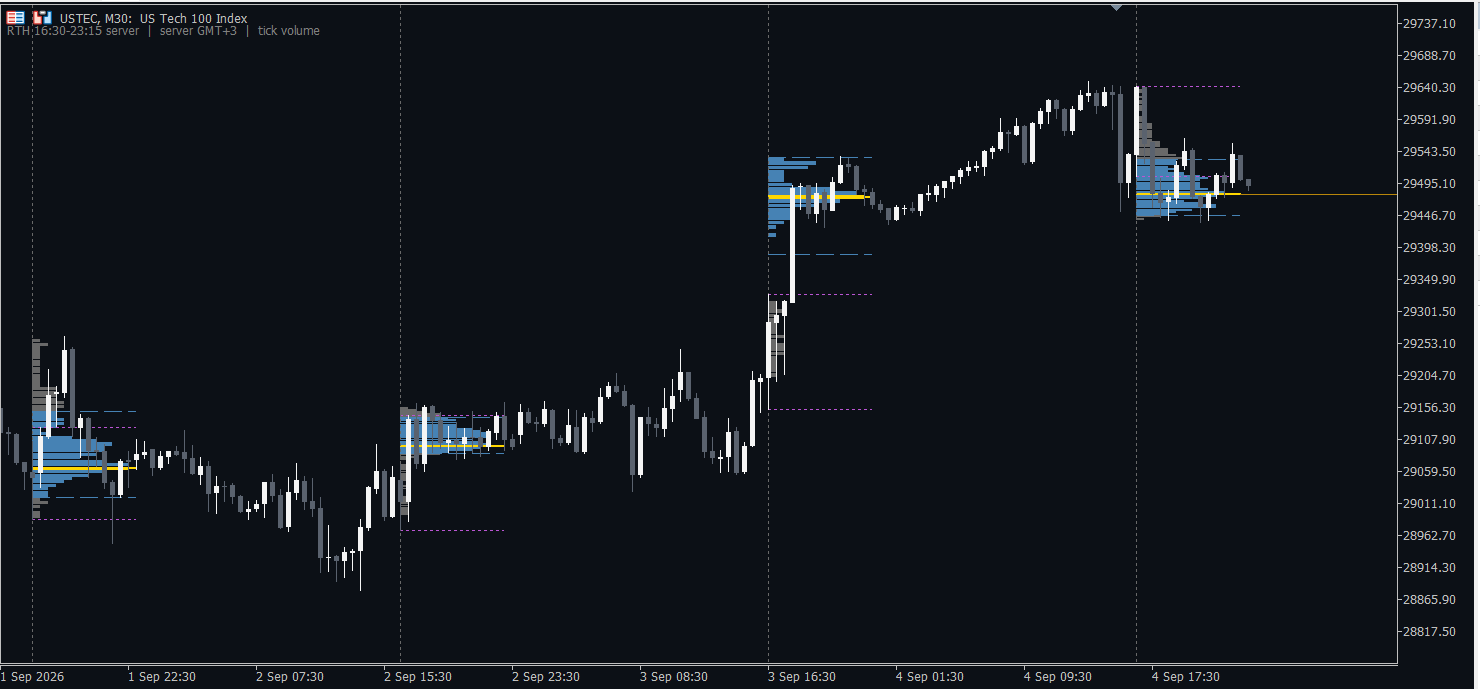
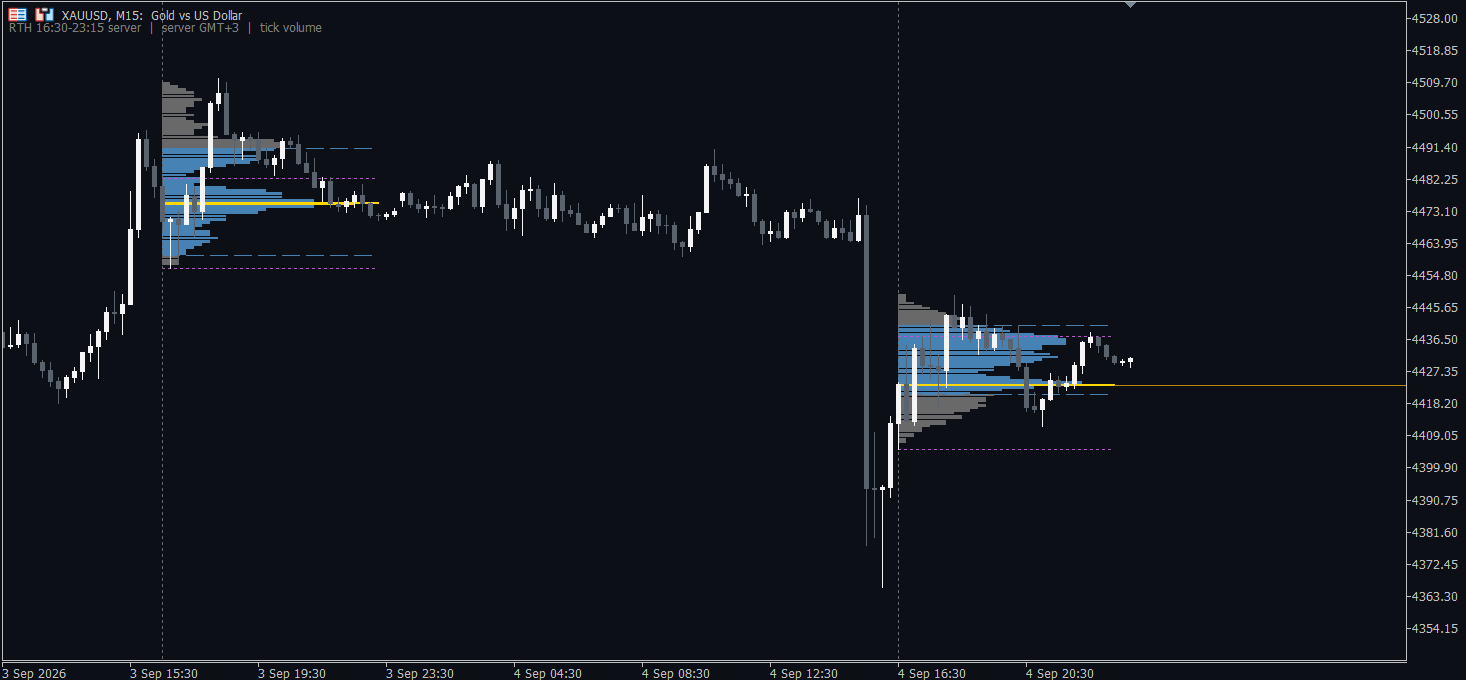
TPO and volume profile per session, with the point of control, the value area, the initial balance, and the naked POCs earlier sessions left behind. Pick RTH and you get the New York cash session — worked out from your own broker's clock and following the daylight-saving changes on the correct dates, which is where most profile indicators quietly drift an hour twice a year.
Buying pressure minus selling pressure, rebuilt tick by tick rather than guessed from the candle. The delta candles carry the true high and low of the running total inside the bar, not just its open and close, so absorption shows up as the long wick it actually is. Divergence against price is marked for you.
On an exchange symbol MetaTrader gives real traded volume and real buy/sell flags, and the numbers are exact. On FX and CFDs it gives neither — only tick volume, the count of price changes. A label in the corner of the chart says which one you are looking at, every time. Most tools let you assume the flattering answer.
MetaTrader 5 · two .ex5 files · two-minute install · no licence key
The zip carries a ready-made chart template too — RTH volume profile with the delta underneath, already set up. Just the template (.tpl).
The copier moves the trade. The next one takes it. An engine that reads absorption, stacked imbalance and the profile the way the method above teaches it — and pulls the trigger itself, straight into the same risk framework.
Absorption at a level, stacked imbalance into it, and whether the profile says that level is worth defending. The same three questions, asked on every tick instead of whenever you happen to be at the screen.
Percent of the account, stop distance, spread counted, hard daily and total drawdown caps. The engine inherits the risk layer that already exists rather than inventing a second one.
Every strategy on this site was measured, and most were dropped for failing out of sample. This one gets the same treatment. No launch date until the walk-forward result is worth showing you.
Try the copier and you are on the list — same email, no second form.
Any MetaTrader 5 account, hedging or netting. Symbol names are found for you — Nasdaq is USTEC at one broker, NAS100 at the next and US100 at a third, and it matches all of them, by name and by the broker's own description. Point value is read from the contract specification rather than assumed, then checked against the live P&L of your first position and corrected if the broker was lying about it. Watch your first trade on a new broker in dry-run.
No, and you should never give it to anyone selling you software. Everything runs on your own PC: an Expert Advisor inside your own terminal, driven by files in MetaTrader's own shared folder. There is no server in the middle, no account credentials stored anywhere, and nothing about your trading leaves the machine.
Then there is no distance to size from, and it refuses the trade rather than guessing one. That is deliberate: inventing a stop for you is exactly how a copier quietly puts on a position ten times bigger than you meant. Add the stop in NinjaTrader and it mirrors on the next read, under a second later. If you would rather it open a fixed token size instead, there is a setting for that.
The MT5 position is held, with its stop and target still on the exchange, and nothing new is opened. It does not flatten you — a ten-second glitch turning into a realised loss is a worse failure than the glitch. When NinjaTrader comes back it reconciles rather than replaying, so a restart mid-trade adopts the position instead of doubling it.
No, and it is the opposite of one. It has no opinion about the market and it never decides a trade. It mirrors the account you are already trading, onto the account you already own. If you take nothing, it does nothing.
Nothing. It is free — there is no licence key, no trial that runs out, no email to leave and no account to create. Download it, install it, and it works for as long as you want it to. Nothing in it expires and nothing asks you for money later.
It also means the copier never phones anywhere to ask whether it is allowed to run, so there is no server that can be down, no week that quietly ends mid-session, and nothing to renew before the open. It runs on your machine and answers to nobody but you.
No honest person can promise that, and I am not going to. Most people who try to trade futures lose money, and a copier cannot change that — it makes your existing trading reach a second account at a correct size, nothing more. If what it is copying loses, it will lose faster on two accounts than on one. Run it on a demo until you have proven your edge with your own data.
Everything on this site is written for one platform and tested against one data feed. If you are starting from nothing, this is the stack to start with.

NinjaTrader® is our #1 recommended trading software platform preferred by traders worldwide including our clients. Download NinjaTrader & receive immediate FREE access to:
NinjaTrader’s award-winning trading platform is consistently voted an industry leader by the trading community. Featuring 1000s of Apps & Add-Ons for unlimited customization, NinjaTrader is used by over 1.9 million traders for advanced market analysis, professional charting and fast order execution. For new traders, start preparing for the live markets with a free trading simulator featuring real-time market data.
Get Started for FREE!→
Kinetick® delivers reliable, fast and cost-effective market data to help level the playing field for active traders. Take advantage of unfiltered, real time quotes for stocks, futures and forex that exceed the expectations of the world’s most demanding traders, like us!
Get started with FREE end-of-day historical market data directly through the NinjaTrader platform and learn how you can significantly reduce CME Group Globex exchange fees on real-time market data with Kinetick.
Get Started with Free EOD Data→Two downloads, both free. The copier mirrors a NinjaTrader account, so that is the side to set up first.
NinjaTrader® is our #1 recommended trading software platform preferred by traders worldwide including our clients. Download NinjaTrader & receive immediate FREE access to real-time futures data, advanced charting and the trade simulator — which is where the copier should spend its first week anyway.
We are a NinjaTrader introducing partner: if you open an account through this link we may be paid a commission. It costs you nothing, and it is what pays for the copier being free.
One installer. It finds NinjaTrader and MetaTrader on your PC, puts every piece where it belongs, and opens a dashboard that walks you through what is left. Start it on a demo account — it places real orders.
Windows · NinjaTrader 8 · MetaTrader 5 · 33 MB · no card, no subscription started.
Both appear for the same reason: this is not yet signed with a code-signing certificate, and until enough people have downloaded it, Microsoft and Google treat any new unsigned program as unknown. That is them doing their job, not a sign that something is wrong with the file. If you would rather check for yourself, the zip is 33 MB, and its SHA-256 is published below — any antivirus or Get-FileHash in PowerShell will confirm it.
SHA-256 · ac1ccc267d616d874c9843603aa92472fa78bfad0c8b98c694cce498da1479cb
Questions before you enrol are free and welcome.
Drop your email and the download starts straight away. You will also hear from me when the strategies get updated — and nothing else.